Receipts & voice quotes
straight into Zoho Books
Snap a photo of a receipt or fuel slip on WhatsApp and upDoc turns it into a draft bill. Or dictate a quote as a voice note and upDoc drafts it, confirms it with you, and creates it in Zoho Books. No app to install.

From R29 per feature per month · Unlimited users · Cancel anytime
How it works
Three simple steps. No training needed.
Snap & send
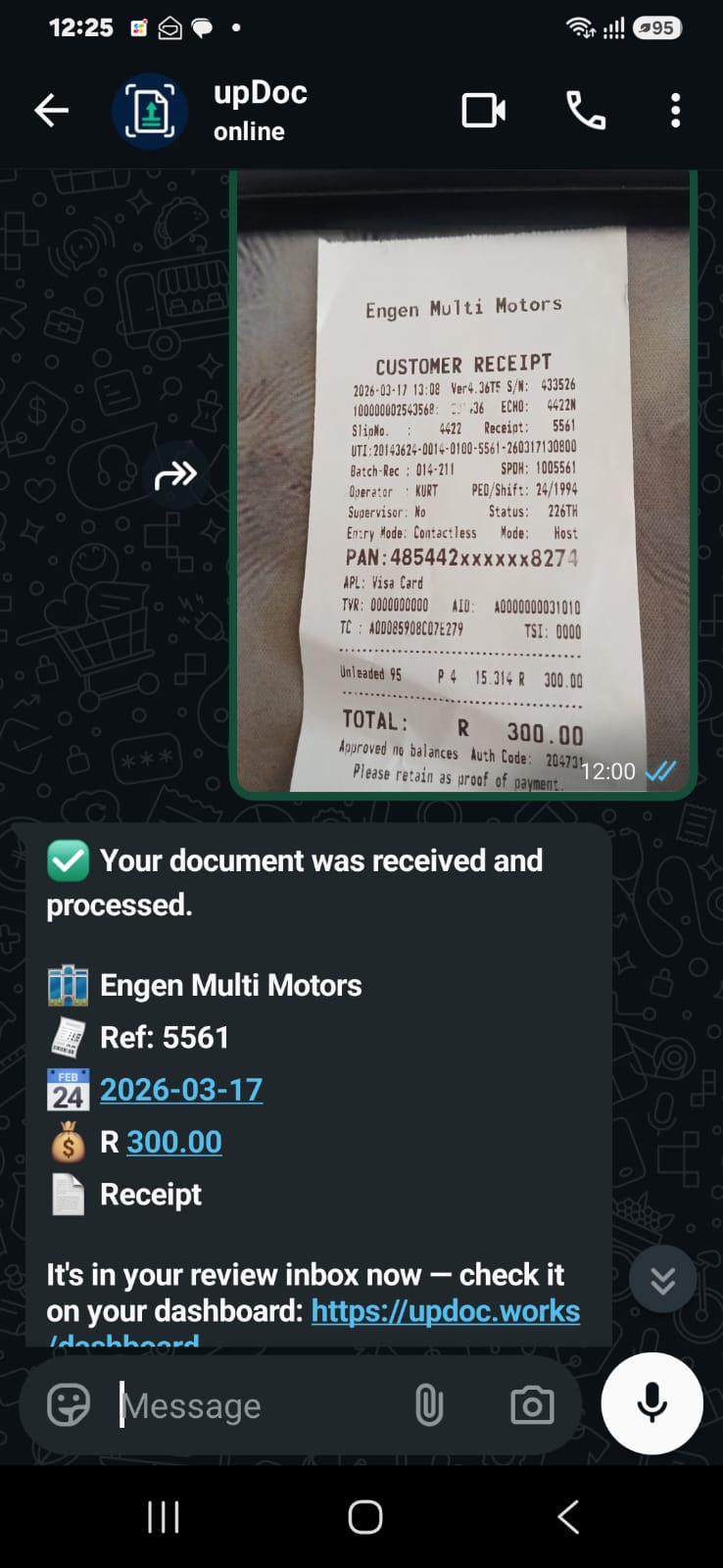
Take a photo of any receipt, fuel slip, or supplier invoice and send it to the upDoc WhatsApp number. That's it - no app, no login, no portal.
AI reads it
upDoc extracts the supplier name, date, reference, line items, and totals using OCR and AI. Everything lands in your review inbox.
Review & publish
Check the extracted data, make any corrections, and hit publish. A draft bill is created in Zoho Books with the original receipt attached.
Create quotes by voice note
Dictate it on the road. upDoc does the paperwork.
Record a voice note
Say the customer name, the items, quantities and prices - e.g. "Quote for Johan, 10 widgets at R50 each". Send it to the upDoc WhatsApp number.
Review the draft
upDoc sends a short summary back on WhatsApp. Reply YES to create it, or open the dashboard to edit the customer or line items first.
Quote in Zoho & PDF
The quote is created in Zoho Books and the PDF is sent back to you on WhatsApp - ready to forward to the customer.
See upDoc in action
Real screenshots from the app.
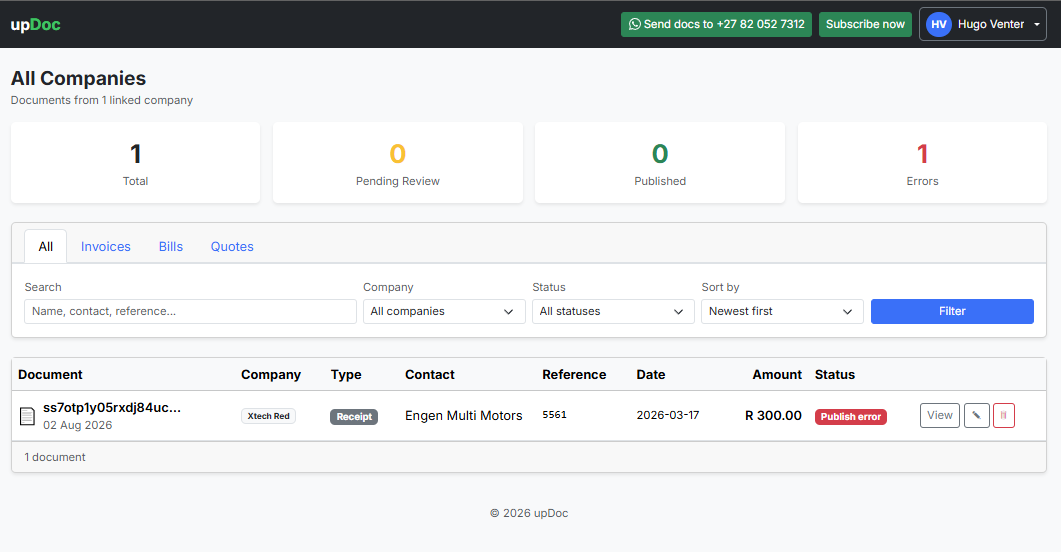
The review inbox
Every document your team sends lands here, ready to check and publish to Zoho Books.
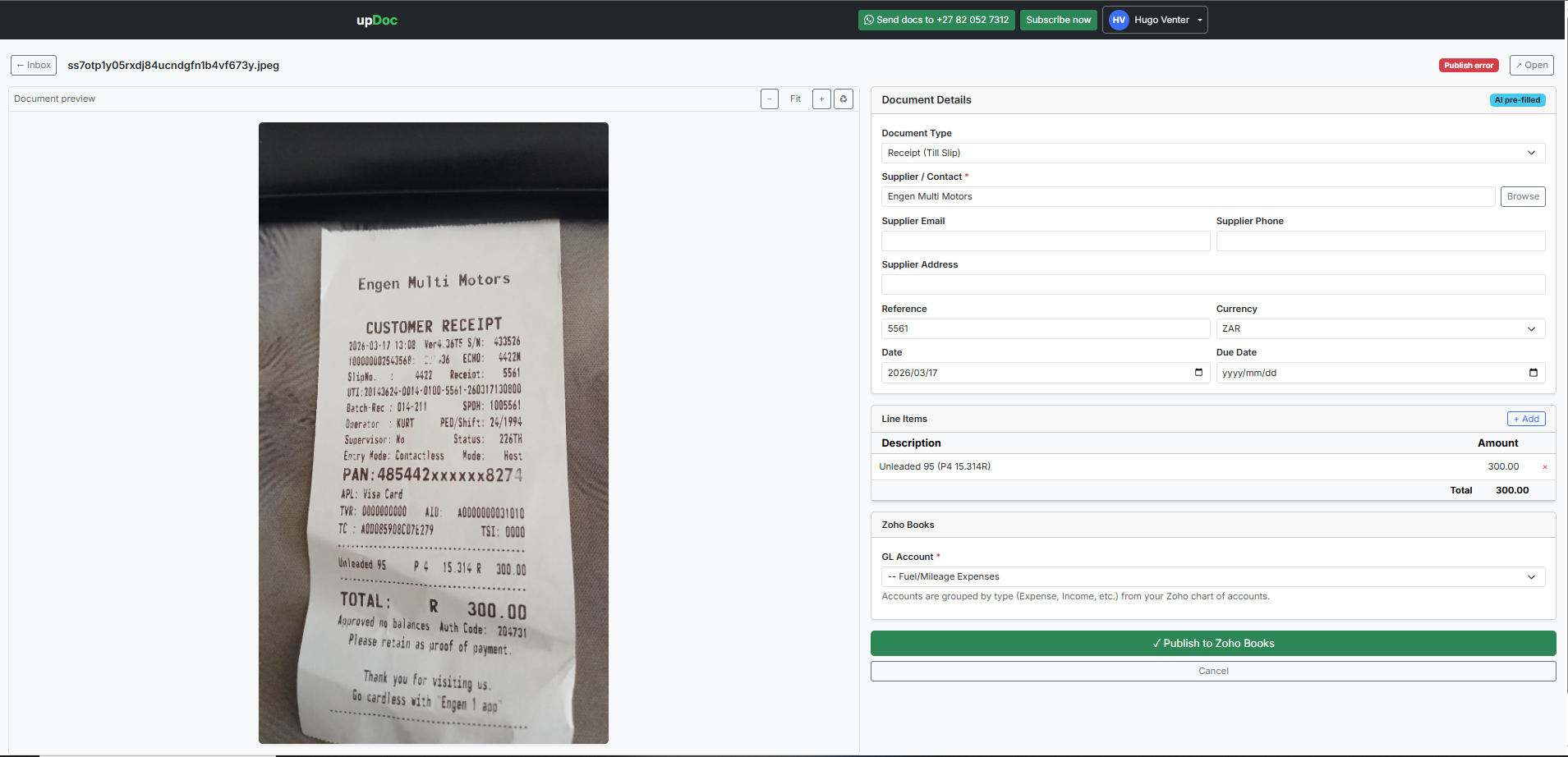
AI-extracted details
Supplier, date, reference, line items and totals are read from the slip and pre-filled for your review.
Built for real-world scenarios
Here's how businesses like yours use upDoc every day
Fuel & Vehicle Costs
Staff fill up the company vehicle and snap the fuel slip. upDoc creates a bill with the correct amount, date, and supplier.
Building Materials
Buy materials for a job from Builders Warehouse or Trade Depot. Send the slip and it appears in Zoho Books as a draft bill.
Takeaway & Client Meals
Client lunch or team takeaway on the company card? Snap the receipt and it's tracked automatically.
Supplier Invoices
Receive a paper invoice from a supplier? Photograph it and upDoc captures every line item for your books.
No app. No portal.
Just WhatsApp.
Your staff already uses WhatsApp every day. upDoc meets them where they are. There's nothing to install, no training required, and no excuses for lost receipts.
- ✓ Works with any phone - iPhone, Android, even feature phones with WhatsApp
- ✓ Unlimited team members - add your whole team at no extra cost
- ✓ AI-powered extraction - supplier, date, reference, line items, totals
- ✓ Create quotes by voice - dictate a quote on WhatsApp and upDoc drafts it, confirms it, and creates it in Zoho
- ✓ Human review - nothing goes to Zoho Books until you approve it
- ✓ Original receipt attached - the photo is saved and attached to the bill in Zoho
Stop losing receipts
No more shoeboxes full of faded slips. Every receipt is digitised the moment it's created.
Save hours every month
Stop manually typing supplier invoices into Zoho Books. Let AI do the data entry.
Always audit-ready
Every transaction has the original receipt attached. Your auditor will love you.
Simple, transparent pricing
R29 per feature per company per month. Unlimited users. No surprises.
per company on Zoho Books
- ✓ Snap a photo of any receipt, fuel slip or invoice
- ✓ AI extracts supplier, date, line items and totals
- ✓ Draft bill in Zoho Books with the receipt attached
- ✓ Unlimited team members & documents
- ✓ Review inbox before anything is published
30-day free trial - no card needed
per company on Zoho Books
- ✓ Dictate a quote as a WhatsApp voice note
- ✓ AI transcribes and drafts the quote for you
- ✓ Confirm with a quick reply - quote created in Zoho Books
- ✓ The quote PDF is sent back on WhatsApp
- ✓ New customers are created in Zoho automatically
30-day free trial - no card needed
Choose one or both features - add the second one any time from your Billing page. Each is R29/month per company. Have multiple companies on Zoho? Each company is billed separately.
Help & FAQ
Everything you need to know about upDoc
upDoc is built and supported by Xtech Red, a South African software company that designs practical tools for small and medium businesses. From instant WhatsApp messaging to document capture and accounting automation, Xtech Red builds the everyday systems that let business owners focus on running their business.
Learn more about the team and what they build at xtech.red, or get in touch through their contact page.
Visit xtech.redAccountant affiliate application
Any accountant who signs up their Zoho clients can qualify for up to 50% cash back, depending on how many of their clients they refer.